Top Worth-a-Try Digital Art Apps for Android & Samsung Tablets in 2026: A Curated Guide for Beginners to Pros

Digital art has never been more accessible on Android devices, especially with powerful Samsung Galaxy Tabs equipped with the S Pen. Whether you’re sketching ideas on the go, illustrating professionally, animating short clips, or exploring vector design, Android offers a wealth of high-quality drawing apps that rival desktop software—many free or low-cost, with excellent stylus support, pressure sensitivity, layers, and customizable brushes.
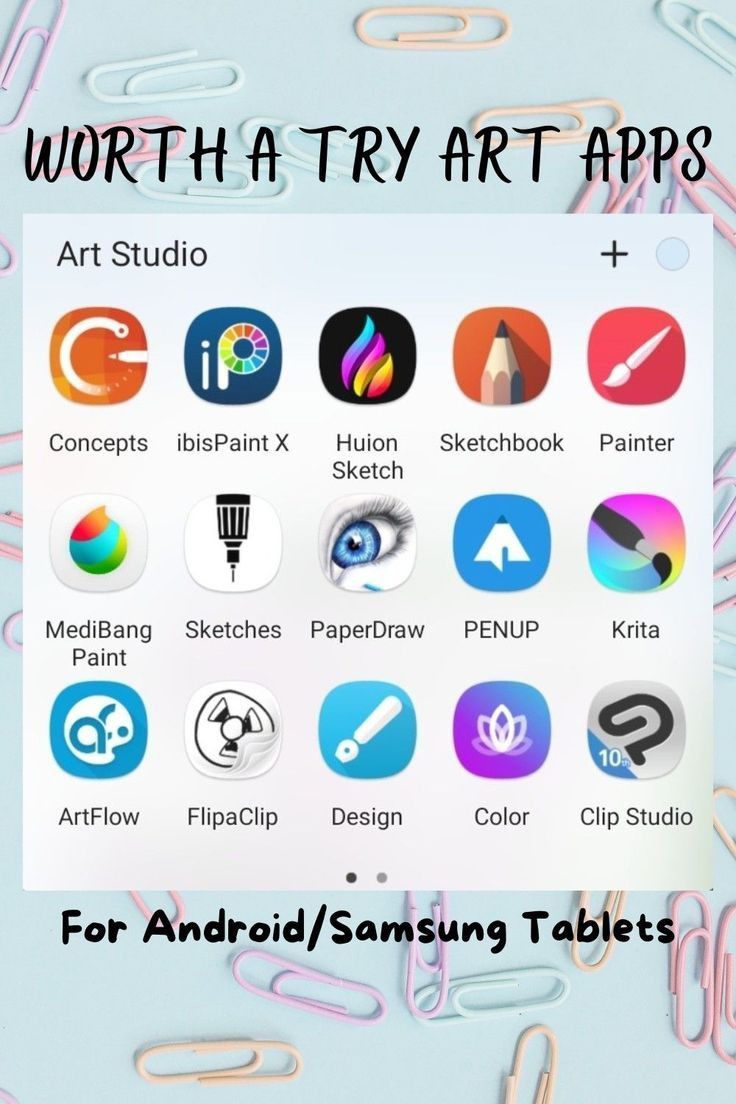
The screenshot above showcases a fantastic collection of “worth a try” apps, curated for Android/Samsung tablet users. This post breaks down each one with key features, ideal use cases, pricing (as of 2026), and why it deserves a spot on your tablet. Perfect for beginners discovering digital art or experienced artists seeking portable workflows.
Top Recommendations from the List (with Quick Overviews)
- ibisPaint X (Free with optional ads/Premium) One of the most downloaded and beloved Android art apps (over 460 million total downloads). Packed with 47,000+ brushes, 27,000+ materials, 2,100+ fonts, filters, screentones, vector tools, animation features, stroke stabilization, symmetry rulers, and process recording. Best for: Anime/manga illustration, detailed painting, beginners to intermediates. Why try it: Extremely feature-rich for free; community-shared brushes and live streaming make it social and inspiring.
- Clip Studio Paint (Subscription or one-time purchase options) The industry-standard for comics, manga, illustration, and animation—fully ported to Android with thousands of free brushes, 3D models, perspective rulers, animation timelines, and cloud sync. Best for: Professional comic/webtoon creators, illustrators needing advanced tools. Why try it: If you’re serious about digital art, this is often called the “Procreate alternative” for Android; seamless transition from desktop.
- Concepts (Free with in-app purchases) Vector-based infinite canvas app designed for touch/stylus, with fluid gesture controls, infinite undo, HSL color picker, and export to vector formats. Best for: Concept art, industrial/UX design, loose sketching, brainstorming. Why try it: Feels natural and non-destructive—perfect for ideation without pixel limits.
- Krita (Completely free & open-source) Powerful desktop-grade painting app on Android with advanced brush engine, layers, masks, animation, PSD support, and no ads/subscriptions. Best for: Realistic painting, digital oil/watercolor effects, professional workflows on a budget. Why try it: No paywalls; huge brush library and customization—ideal for tablets with good performance.
- MediBang Paint (Free) Cloud-based app tailored for manga/comics with pre-made screentones, brushes, 3D poses, perspective tools, and community sharing. Best for: Manga artists, collaborative projects, quick comic panels. Why try it: Free forever with cloud backup; easy to share work directly to social platforms.
- Sketchbook (Free) Clean, intuitive interface from Autodesk with customizable brushes, predictive stroke, perspective guides, layers, and large canvas support. Best for: Beginners, clean sketching, illustration without clutter. Why try it: Minimalist yet powerful; excellent S Pen integration and no aggressive monetization.
- ArtFlow (Free with premium upgrade) Natural painting app with realistic brushes (oil, watercolor, acrylic), layers, PSD export, and stylus pressure. Best for: Traditional media simulation on digital. Why try it: Beautiful, painterly results with a simple UI—great for fine art studies.
- FlipaClip (Free with in-app purchases) Frame-by-frame 2D animation app with onion skinning, audio import, layers, and drawing tools. Best for: Short animations, cartoons, stop-motion style. Why try it: Fun and approachable for animators starting out on mobile.
- Huion Sketch (Free) Lightweight sketching app optimized for Huion tablets but works great on Samsung with pressure-sensitive brushes and layers. Best for: Quick sketches, note-taking with art. Why try it: Simple and performant on mid-range tablets.
- PENUP (Free, Samsung-exclusive features) Official Samsung app with daily drawing challenges, coloring books, live drawing sessions, and S Pen-optimized tools. Best for: Casual artists, learning through challenges, community feedback. Why try it: Built-in motivation with global contests and tutorials.
Additional Standouts from the Screenshot
- Infinite Painter (One-time purchase): Highly praised for natural brushes and gesture controls—often a top pick in 2026 reviews.
- Painter (Likely Corel Painter Mobile): Premium realistic brushes for oil/acrylic emulation.
- Art Studio (Appears as the gallery app): Possibly a hub or specific app for organizing/starting new canvases.
- 10 (Possibly ArtRage or similar numbered app): Focus on natural media simulation.
Quick Tips for Getting Started on Samsung Tablets
- Enable S Pen pressure sensitivity in app settings for natural feel.
- Use a matte screen protector for paper-like drawing experience.
- Start with free apps (Krita, ibisPaint X, Sketchbook) before investing in subscriptions.
- Export frequently to cloud (Google Drive, Clip Studio Cloud) for backups.
- Join communities on Reddit (r/GalaxyTab, r/DigitalPainting) or X for app-specific tips.
These apps prove Android tablets are serious creative tools in 2026—no iPad required. Download a few, experiment on your Galaxy Tab, and find your perfect match. Which one are you trying first? Share your sketches or favorite features in the comments!