The Three-Layer Tree Method: Forma, Volumen, Textura – A Professional Step-by-Step Tutorial for Dynamic Tree Design in Concept Art & Illustration

Description (Long-Form Tutorial Post):
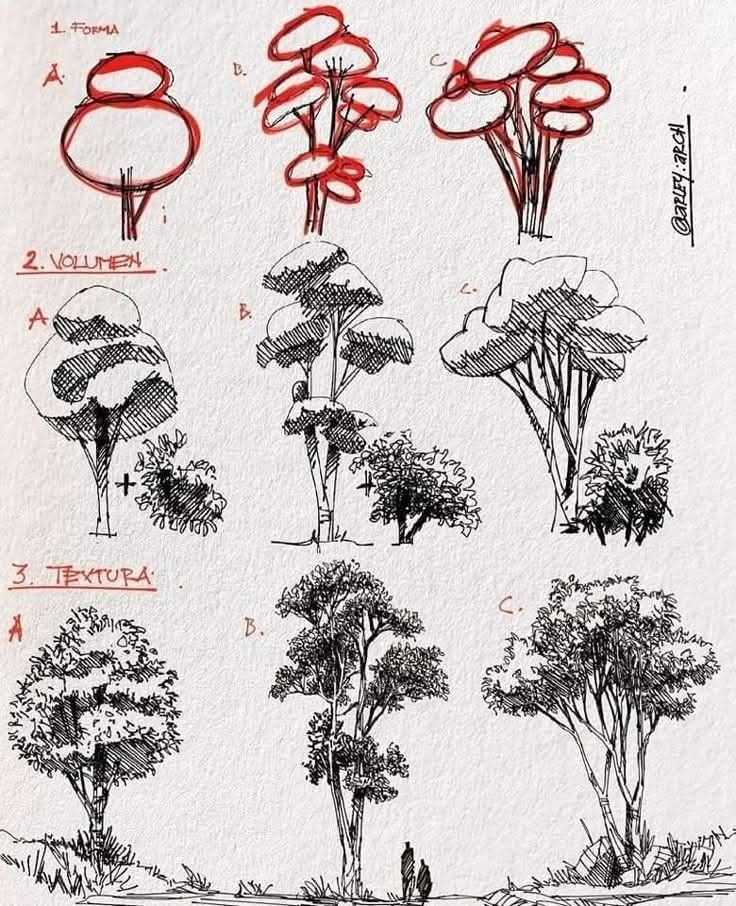
Master the art of believable, expressive tree design with this proven three-phase workflow: Forma (Shape), Volumen (Mass), and Textura (Detail). Originally shared by environment artist @bailey_arch, this structured approach transforms flat, generic foliage into dynamic, story-rich natural elements perfect for concept art, matte painting, game environments, and visual development.
Whether you’re sketching in Procreate, blocking out assets in Blender, or painting epic landscapes in Photoshop, this method ensures silhouette clarity, depth readability, and organic realism—every time.
Why This Method Works
Trees are more than background filler—they’re architectural elements in your scene. A poorly designed tree breaks immersion; a well-designed one guides the eye, frames architecture, and tells environmental history.
This tutorial breaks tree creation into three non-negotiable layers, each building on the last to create hierarchy, rhythm, and visual interest.
PHASE 1: FORMA (Shape & Silhouette)
Goal: Establish a strong, readable silhouette with clear scale hierarchy.
| A. Simple | B. Balanced | C. Complex |
|---|---|---|
| Single oval canopy on thin trunk | Tiered ovals with branching | Overlapping, asymmetrical clusters |
| Too basic – lacks character | Good foundation – clear small/medium/large | Ideal – dynamic, wind-swept, natural |
✅ Do This:
- Use 3–5 distinct canopy masses
- Vary size, angle, and overlap
- Avoid perfect symmetry or even spacing
- Tilt masses to suggest wind direction or age
❌ Avoid:
- Single blob shapes
- Evenly stacked layers
- Vertical trunks with no lean
Pro Tip: Test your silhouette at 10% zoom. If it reads as an iconic shape, you’ve nailed Phase 1.
PHASE 2: VOLUMEN (Mass & Structure)
Goal: Convert flat shapes into 3D forms with light logic and spatial depth.
| A. Basic | B. Structured | C. Advanced |
|---|---|---|
| Flat shading, no sub-forms | Defined light/shadow sides | Overlapping volumes + negative space |
| Flat | Good | Professional |
✅ Do This:
- Chunky hatching to suggest rounded volume
- Core shadow on the underside of each mass
- Overlap smaller forms in front of larger ones
- Add negative space (sky holes) between branches
❌ Avoid:
- Outlining every leaf
- Flat cross-hatching with no direction
- Ignoring light direction
Light Source Rule: Pick one dominant light (e.g., top-left) and stick to it across all masses.
PHASE 3: TEXTURA (Detail & Refinement)
Goal: Add surface believability without losing the big picture.
| A. Sparse | B. Balanced | C. Rich |
|---|---|---|
| Minimal texture | Strategic foliage clusters | Dense but controlled |
| Underwhelming | Ideal | Risk of noise |
✅ Do This:
- Cluster foliage in triangular groups
- Use scribbled texture only on lit edges and outer silhouette
- Leave deep shadows dark and clean
- Add ground debris, vines, or moss for ecological storytelling
❌ Avoid:
- Texturing the entire canopy uniformly
- Over-rendering internal branches
- Ignoring scale (tiny scribbles on a massive tree = unreadable)
The Complete Workflow Checklist
| Phase | Checklist Item |
|---|---|
| 1. Forma | □ 3–5 canopy masses □ Varied sizes & angles □ Strong silhouette at thumbnail size |
| 2. Volumen | □ Consistent light direction □ Core shadows under forms □ Sky holes for depth |
| 3. Textura | □ Texture only on edges □ Foliage in clusters □ Ground details (roots, grass, rocks) |
Advanced Applications
Environment Integration
- Use C-shape trees to frame architecture
- Cluster B-type trees for midground rhythm
- Reserve A-type for distant simplification
Narrative Design
- Leaning trees → wind-swept coast
- Sparse texture → drought or winter
- Vines + moss → ancient, humid forest
Digital Tools Setup
- Brush 1 (Forma): Hard round, 100% opacity
- Brush 2 (Volumen): Chalky texture, pressure-sensitive
- Brush 3 (Textura): Custom leaf/foliage stamp (low opacity)
Final Comparison
| Weak Tree | Strong Tree |
|---|---|
| Single shape | Tiered, overlapping masses |
| Flat shading | Directional volume |
| Even texture | Edge-focused detail |
| No ground contact | Roots + debris |
Downloadable Resources
- [Tree Forma Template (PSD)] – Pre-layered for practice
- [Foliage Brush Pack] – 12 custom scribble brushes
- [Silhouette Reference Sheet] – 50 thumbnail trees
Link in bio / available for Patreon supporters
Artist Credit: @bailey_arch – Environment Design & Visual Development Tutorial by: [Your Studio/Name] – Professional Concept Art Education
Master trees. Master environments. One layer at a time.