The Ultimate Pine Tree Design Formula: From Primitive Glyphs to Full Foliage – A Professional Step-by-Step Environment Art Tutorial

Description (Long-Form Tutorial Post):
Unlock the universal language of pine tree design with this master-level breakdown of the “Triangle + Scribble” method—a time-tested workflow used by top environment artists, matte painters, and concept illustrators worldwide.
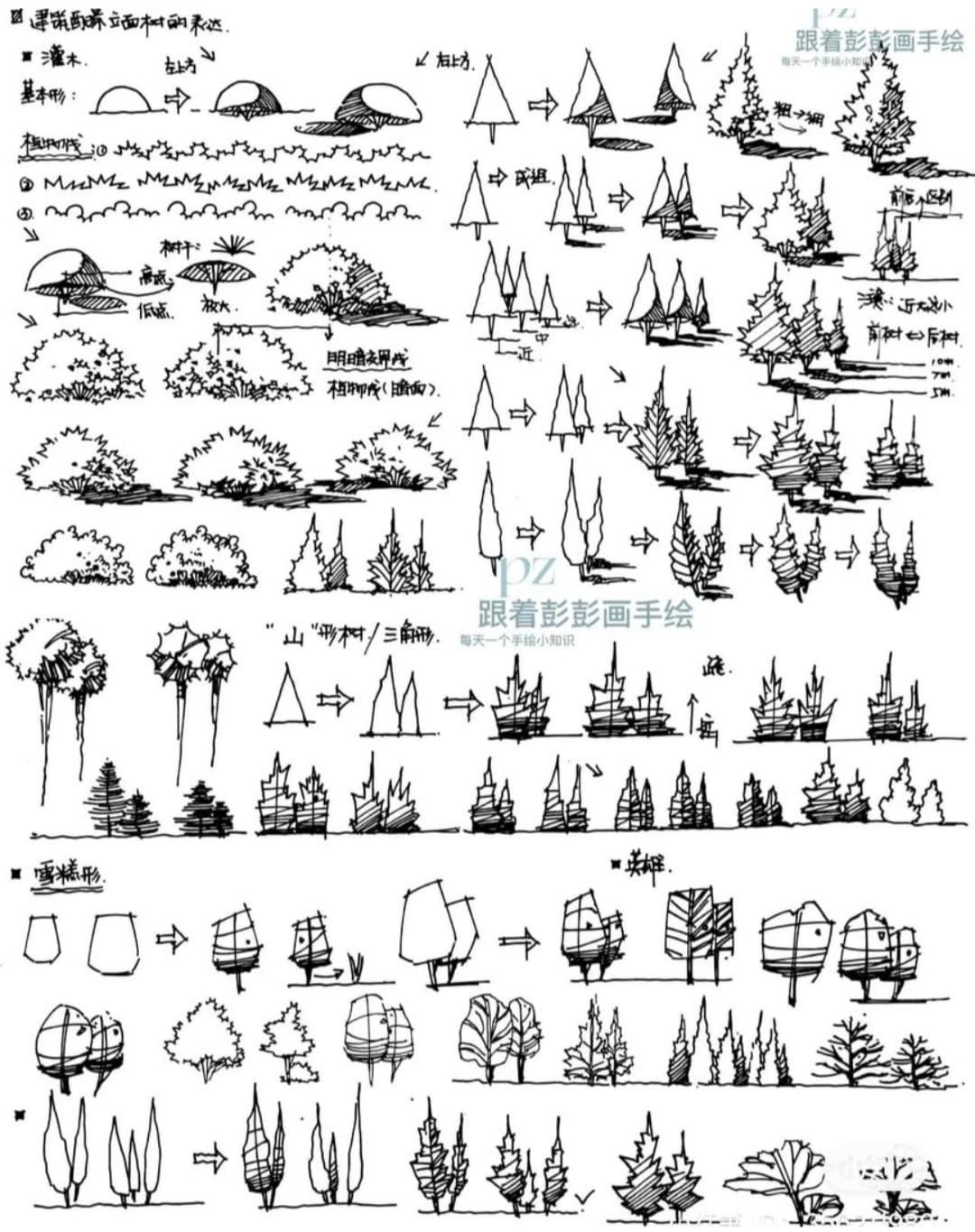
Translated and expanded from an original Chinese master sheet (artist: PZ), this tutorial distills over 100 progressive examples into a repeatable, scalable system for creating believable conifers at any distance, style, or fidelity.
Whether you’re thumbnailing a forest, blocking 3D assets, or painting hero trees, this method guarantees silhouette clarity, depth hierarchy, and effortless variation—every time.
Why Pine Trees Are the Ultimate Environment Stress Test
Pines are deceptively complex:
- Repetitive branches → risk of monotony
- Dense foliage → easy to over-render
- Strong verticality → silhouette must read instantly
Master pines, and you’ve mastered 90% of environment foliage logic.
THE CORE FORMULA: 5 STAGES OF COMPLEXITY
| Stage | Glyph | Goal | Key Principle |
|---|---|---|---|
| 1. Primitive | △ | Establish trunk + apex | One triangle = one tree |
| 2. Branch Scaffold | △→△△ | Add primary branches | 3–5 tiers, decreasing size |
| 3. Foliage Mass | △+✍ | Convert branches to volume | Scribble = cloud-like clumps |
| 4. Texture Pass | ✍✍ | Suggest needle density | Darker at core, lighter at edge |
| 5. Grounding | +roots/terrain | Anchor to world | Roots, rocks, snow, grass |
STAGE 1: PRIMITIVE GLYPH LIBRARY
Goal: Build a visual shorthand for instant thumbnailing.
| Symbol | Tree Type | Use Case |
|---|---|---|
| △ | Young pine | Distant forest |
| ▲ | Mature, narrow | Midground |
| ▼ | Wind-swept | Coastal/cliff |
| ◄► | Fallen/dead | Foreground drama |
✅ Do This:
- Vary height-to-width ratio
- Tilt apex to suggest wind or damage
- Cluster in odd numbers (3, 5, 7)
STAGE 2: BRANCH SCAFFOLD PROGRESSION
Goal: Create structural rhythm before foliage.
Step-by-Step Evolution:
- Single trunk →
- Add apex triangle → △
- Branch tiers → △→△△△
- Vary angles → △↗△↘△
- Overlap → △◄△►△
✅ Branch Rules:
- Top branches smallest
- Middle branches longest
- Bottom branches droop (gravity)
- Never mirror left/right
STAGE 3: FOLIAGE MASS CONVERSION
Goal: Replace lines with 3D volume.
The “Scribble = Cloud” Technique:
| Scribble Type | Effect |
|---|---|
| ✍ (tight) | Dense, young needles |
| ~~~ (loose) | Wind-blown, old growth |
| ✦ (starburst) | Snow-laden |
| ●●● (dots) | Distant simplification |
✅ Foliage Application:
- Start at branch tips
- Work inward (darker core)
- Leave sky holes between clumps
- Follow light direction (lit side = lighter scribble)
STAGE 4: TEXTURE & DETAIL HIERARCHY
Goal: Add surface believability without noise.
Three-Zone Texture System:
- Outer Edge → Light, sparse scribbles
- Mid-Tone → Medium density, directional strokes
- Core Shadow → Dark, minimal detail
✅ Advanced Details:
- Bark texture: Vertical hatching on trunk
- Dead branches: Sharp, thin lines
- Snow caps: Flat white on upper clumps
- Moss/lichens: Dotted texture on north side
STAGE 5: ENVIRONMENTAL INTEGRATION
Goal: Make trees belong to the world.
Grounding Checklist:
| Element | How to Draw |
|---|---|
| Roots | Jagged lines into terrain |
| Rocks | Negative space cuts |
| Snow | Flat base + drift lines |
| Grass/Ferns | Thin verticals at base |
| Mist/Fog | Fade lower 1/3 of tree |
THE ULTIMATE PINE DESIGN MATRIX
| Distance | Stage | Tool | Time |
|---|---|---|---|
| Thumbnail | 1–2 | Hard round | 10 sec |
| Midground | 1–3 | Chalk brush | 1 min |
| Hero Tree | 1–5 | Custom foliage stamp | 5–10 min |
Pro Workflow: Digital Setup
| Layer Name | Brush | Opacity | Purpose |
|---|---|---|---|
| Silhouette | Hard round | 100% | Stage 1–2 |
| Foliage Mass | Cloud brush | 70% | Stage 3 |
| Texture | Needle stamp | 40% | Stage 4 |
| Grounding | Smudge + eraser | 30% | Stage 5 |
Common Mistakes & Fixes
| Problem | Fix |
|---|---|
| Trees look like lollipops | Droop lower branches |
| Foliage too uniform | Vary scribble density |
| No depth | Darken core, lighten edges |
| Forest looks flat | Vary tree heights + overlap |
Bonus: 50 Pine Thumbnail Reference Sheet
- 10 young pines
- 15 mature variations
- 10 wind-swept/damaged
- 15 snow-laden/foggy
Download PDF below
Downloadable Assets
- [Pine Brush Pack (ABR)] – 20 custom scribble + needle brushes
- [PSD Master File] – All 5 stages, fully layered
- [Glyph Cheat Sheet (PNG)] – Print & trace
- [3D Blockout Starter (BLEND)] – For Blender users
Free for newsletter subscribers / Full pack on Patreon
Original Artist: PZ (@pz_envart – Weibo) Translated & Expanded by: [Your Studio/Name] – Environment Art Education Tags: #PineTreeTutorial #EnvironmentDesign #ConceptArt #DigitalPainting #MattePainting #GameArt #Worldbuilding #FoliageDesign
One triangle. Infinite forests.