How to Draw a Dramatic Floating Temple Landscape in Two-Point Perspective – Complete Step-by-Step Environment Tutorial

Description (Perfect for an art tutorial website, YouTube video description, or ArtStation breakdown)
Create breathtaking, otherworldly environments like floating temples, sky islands, or ancient mountain sanctuaries with confidence! This fully illustrated, beginner-to-intermediate tutorial walks you through the exact professional process used by concept artists and illustrators to design dramatic, large-scale landscapes that feel vast, balanced, and cinematic.
What You’ll Learn
- How to start with a strong, simple thumbnail idea
- Setting up accurate two-point perspective for towering vertical elements and floating landmasses
- Blocking in massive shapes first for perfect composition and scale
- Progressing from rough construction to refined line art and finally to professional-level value and lighting
- Proven workflow that works for both traditional and digital artists
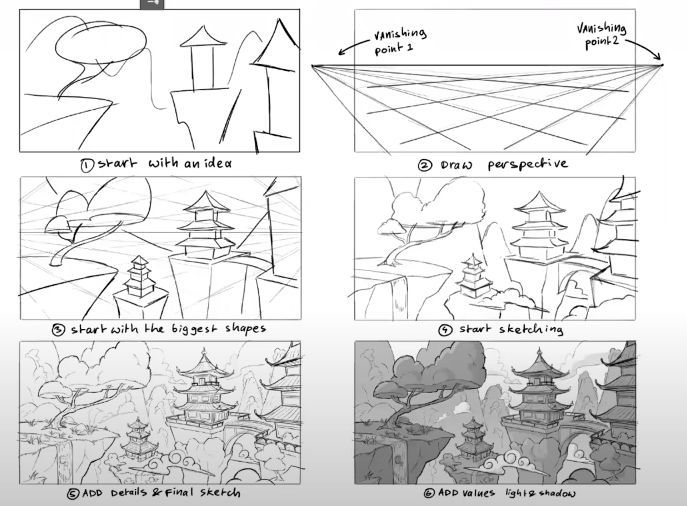
Step-by-Step Process (Exactly as Shown in the Image)
Step 1 – Start with an Idea (Thumbnail) Begin with a tiny, loose sketch (no bigger than a postage stamp). Focus only on the big idea: a majestic multi-tiered pagoda-style temple perched on floating rocks, connected by an ancient winding path, surrounded by misty peaks and twisted trees. Keep it rough — this stage is purely about silhouette, mood, and storytelling.
Step 2 – Draw the Perspective Grid Establish your horizon line and place two vanishing points far off the page (VP1 left, VP2 right). All major horizontal lines of the architecture and floating islands will converge toward these points. This grid is your safety net — it guarantees everything feels grounded in believable space, even when the subject is fantastical.
Step 3 – Block the Biggest Shapes First Using light construction lines, draw the largest masses: the main temple body, the floating rock platforms, distant mountain silhouettes, and the largest trees. Work from biggest to smallest. This ensures perfect proportions and prevents you from wasting time detailing something that will later need to be resized or moved.
Step 4 – Start Sketching the Forms Refine the big shapes into recognizable architecture and organic elements. Add the characteristic curved roofs of East Asian temples, support beams, secondary pagodas, bridges, and rock texture. Keep lines light and flowing — you’re still building structure, not finishing yet.
Step 5 – Add Details & Final Clean Line Art Now commit to your final line weights. Thicker, darker lines in the foreground, thinner and lighter lines as objects recede. Add wooden planks, shingles, lanterns, railings, tree bark texture, and mist-shrouded background temples. Every detail should reinforce depth.
Step 6 – Add Values, Light & Shadow (Finish) Establish a clear light source (usually top-left or top-right). Block in large value zones first: dark shadowed undersides of floating rocks, bright sunlit temple roofs, and mid-tone misty atmosphere. Use strong contrast in the foreground and gradually softer, lower-contrast values toward the background to push atmospheric perspective. Final touches: glowing sky highlights, subtle rim lighting on edges, and soft cloud shadows.
Pro Tips from the Workflow
- Keep vanishing points extremely far apart for majestic, low-distortion two-point perspective — this prevents the “fish-eye” look on tall architecture.
- Use curved, S-shaped paths and tree branches to lead the viewer’s eye through the composition.
- Floating islands feel more believable when you add hanging roots, waterfalls, or broken stone bridges connecting them.
- Atmospheric haze is your best friend for depth — gradually cool and lighten colors as they recede.
- Work digitally? Use separate layers: 1) perspective grid, 2) big shapes, 3) clean line art, 4) values/shading.
This exact method is used daily in film, animation, and game concept art pipelines (Studio Ghibli, Riot Games, Blizzard, etc.). Master it once, and you’ll be able to design any epic environment quickly and confidently.
Tools used in this example: Traditional pencil + digital refinement in Photoshop (but works perfectly with Procreate, Clip Studio Paint, Krita, or pencil & paper).
Ready to create your own legendary floating kingdoms? Follow these six steps and watch your environments transform from flat sketches to portfolio-worthy masterpieces.